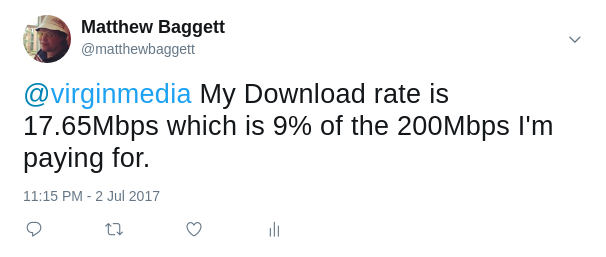
So, I was tired of my ISP charging me for 200Mbps and providing one-tenth of that.
- JavaScript 95.3%
- Dockerfile 4.7%
| Filename | Latest commit message | Latest commit date |
|---|---|---|
| .dockerignore | ||
| .gitignore | ||
| docker-compose.yml | ||
| Dockerfile | ||
| package.json | ||
| Readme.md | ||
| screenshot.png | ||
| speedtest-bitcher.js | ||


ISP Performance Monitor & Twitter 'performance alert'
So, I was tired of my ISP charging me for 200Mbps and providing one-tenth of that.
I figure I should let them know in a programmatic manner.
Usage
Simply create a file called docker-compose.yml and fill it as so:
version: "2"

services:
  performancemonitor:
    image: matthewbaggett/speedtest-performance-tweeter
    environment:
     - EXPECTED_DOWNLOAD=200
     - EXPECTED_UPLOAD=20
     - THRESHOLD_PERCENTAGE=90
     - COMPANY_TWITTER_ACCOUNT=@ispofchoice
     - TWITTER_CONSUMER_KEY=
     - TWITTER_CONSUMER_SECRET=
     - TWITTER_ACCESS_TOKEN_KEY=
     - TWITTER_ACCESS_TOKEN_SECRET=
You will need to add some keys for twitter, which you can find yourself.
Then, to run it, simply run docker-compose run performancemonitor manually, or on a crontab.
Cheers!